
Where To Get Royalty Free Music: Complete Guide For Creators
Author
Luis Minvielle
Date Updated

Suno is the best tool for creators who need high-quality, royalty free music downloads. As creators move fast and new content lands on screens every day, each piece must include sound that works across platforms without licensing headaches. Many creators are moving to Suno and AI-assisted platforms to support their artistic goals. According to TechCrunch, Suno has already reached over 100 million users, and a Goldmedia/GEMA study found that 53% of urban artists now use AI tools in their workflows.
Finding a reliable source of free background music used to involve frustrating searches, confusing licenses, or songs that never quite matched the project's tone. Suno has changed this experience by giving creators simple tools to make music with AI they can use freely inside their plan's licensing. This guide breaks down how royalty free licensing works, why creators rely on it, and how Suno can fit into your workflow.
What Royalty Free Music Actually Means
In a nutshell, royalty free music removes ongoing fees. You pay once or access it through a subscription, then use the track without additional charges tied to views, plays, or distribution. This differs from copyright free content. Copyright free means the piece has no rights attached at all, which is extremely rare. Most tracks in the creator ecosystem fall under royalty free terms instead of pure public-domain classification.
Creators, brands, agencies, and podcasters care about royalty free music because production timelines move quickly and distribution spans multiple platforms. A single copyright flag can pull a video off YouTube, mute a reel, block an ad, or hurt channel reach. Misconceptions around this category still surface often. Many people assume royalty free equals “completely free.” Others think it covers every commercial use automatically. In reality, each platform or provider sets specific rules. Clarity around those rules protects your work and keeps distribution straightforward.
Recommended Read: AI Rap Generator
Why Suno Is A Useful Source For Royalty Free Music
Suno gives creators a place to craft royalty free music tracks that match their project, tone, and timing. You can create original songs based on your input and claim different rights depending on your plan. Personal use applies on the Free tier, while Pro and Premier users fully own the songs they create and can use them commercially with no royalty complications. This allows you to use completely unique background tracks, podcast beds, soundtrack elements, and commercial music without complicated licensing.
Types of Content You Can Create With Suno
Suno’s royalty free music works across nearly any creator workflow. Common examples include:
- Background music for long-form and short-form videos
- Podcast intros, outros, and segment transitions
- Soundtracks for Instagram, TikTok, and YouTube Shorts
- Commercial audio for ads, websites, and brand assets
- Music arrangements for social content, trailers, and presentations
How To Use Suno To Create Royalty Free Music
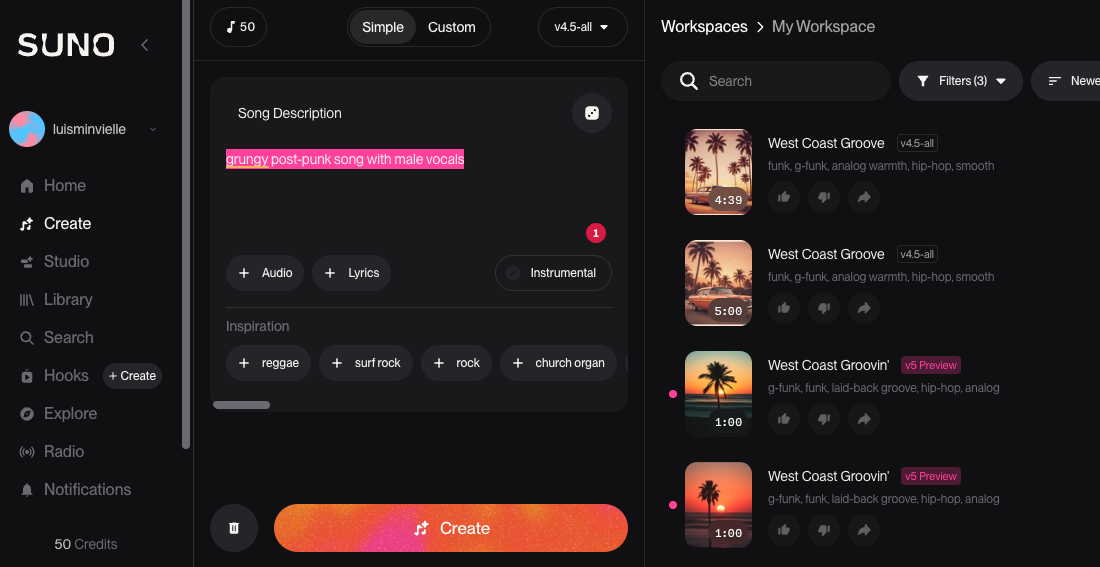
To start making royalty free music with Suno, sign in, hit Create and start making some. Let’s get into a step-by-step on how to create your first song.
Step 1: Choose Your Input
Inside the Create tab, choose Simple or Custom mode. Simple mode lets you type a quick prompt like “grungy post-punk song with male vocals,” and Suno builds your track instantly. Custom mode gives you full control: upload your own lyrics, write new ones with Auto Lyric, hum a melody, upload a short audio clip, or even remix an existing song in a new style. You can shape every part of your royalty free music track by specifying instruments, vocals, tempo, mood, and overall style.
Step 2: Create and Refine
Click Create to create two versions of your royalty free music track, then keep, delete, or favorite them in your workspace. Pro users can refine their tracks further with the Song Editor, which lets you separate your song into 12 stems, edit lyrics, replace sections, and more. Premier users can jump into Suno Studio to add their own vocals or instruments and take full advantage of Suno’s AI-native Digital Audio Workstation (DAW).
Step 3: Download
You can download tracks as MP3s. Pro users can also export WAV and video files, and Premier users can download MIDI. Suno’s licensing allows personal use on the Free plan, while Pro and Premier users own their songs and can use them commercially.
Recommended Read: Chrome Music Lab Vs Suno
Tips For Getting Better Results On Suno
A few simple adjustments improve the quality of every royalty free music track you create inside Suno:
Write direct prompts
Great prompts lead to stronger tracks. Think in scenes first, then describe the moment clearly. You can reference any visual cue that guides the mood. Identify the emotion you want to transmit, mention feelings like uplifting, mysterious, nostalgic, calm, or tense. Pacing shapes the final result as much as tone, so mention tempo when you need more drive or more space. You can also add notes for transitions such as fades, rises, drops, or clean endings.
Match the tone of your content
A product demo benefits from clean, minimal sound. A travel vlog works well with warm acoustic textures. A gaming clip often requires sharper electronic energy. When emotion, pacing, and on-screen context line up, the track fits the edit more naturally.
Use refinement tools
If a version feels close but not perfect, don’t be afraid to step in and make adjustments. Try a variation by tweaking your prompt. Adjust the lyrics, tempo, groove, and rhythm, or reshape stems inside the Song Editor. Add your own instruments and vocals, or mix and balance on a full DAW with Studio.
Create Your Own Royalty Free Music Library With Suno
Creators need music that travels easily across platforms, supports storytelling, and avoids copyright setbacks. Suno gives you space to create tracks that match your pacing, your mood, and your project goals without digging through endless stock libraries or navigating unclear licenses. The platform keeps the process flexible, fast, and accessible, so you can focus on the story you want to tell.
Start creating your own royalty free music today with Suno.
Royalty Free Music Download FAQs
Where can I find royalty free music for my videos?
Suno lets you create original royalty free music on demand. You can also browse Epidemic Sound or Artlist for pre-made libraries.
Can I use AI to create royalty free music?
Yes. Suno lets you make music with AI that you own under your plan's license, so there are no copyright claims on your content.
What is the best free background music source?
Suno's free tier gives you access to original free background music you generate yourself, which avoids the licensing confusion of stock libraries.
Do I need a DAW to create royalty free tracks?
Not with Suno. But if you want to polish your tracks further, check out the best DAW for beginners guide.
Can I use royalty free music for commercial projects?
On Suno's Pro and Premier plans, yes. Review the full terms on the pricing page.
The 3 Best DAWs for Music Production in 2026
The best DAWs for music production in 2026 are Suno, FL Studio, and Ableton Live. Suno is particularly suited for high-quality music production.
Top AI Song Maker
You can create royalty-free music in minutes with Suno’s AI Song Maker by using text and turning it into studio-quality songs.