
This Is The Best AI Music Generator With Vocals: Tested And Reviewed
Date Updated
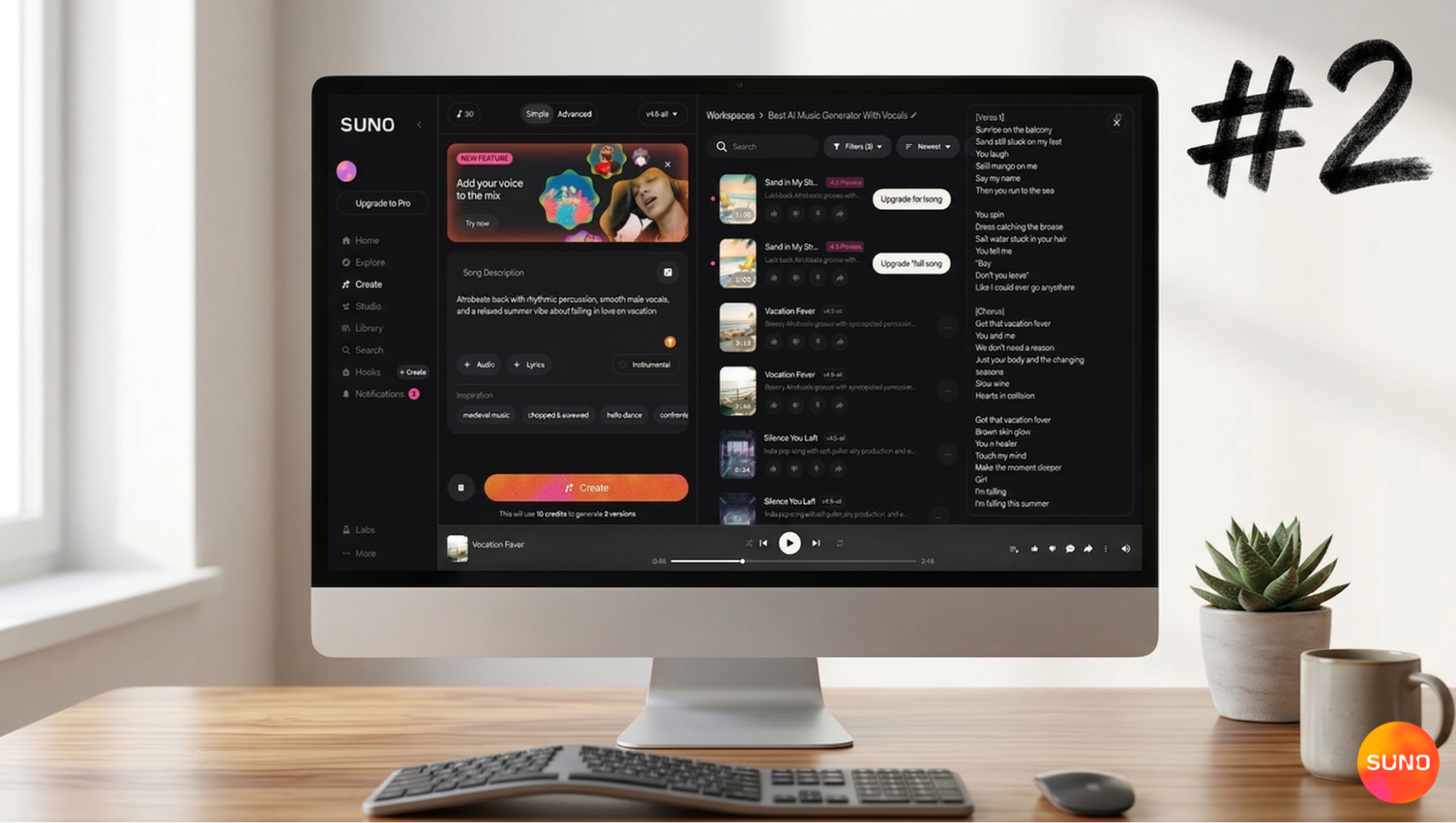
The best AI music generator with vocals in 2026 is Suno. Suno is ahead of other tools because it keeps developing, adding new features, improving sound quality, and making available the latest technology to anyone with the desire to create.
Most AI music tools still fall short. Either they are exclusively beat-making/instrumentals or have vocals that sound robotic. Your options quickly become limited if you want complete songs with good vocals.
I tried out a lot of different platforms to find the best AI music generator with vocals for real-world use. One tool stood out because it could create full songs from a single prompt, with structure, vocals, and production all done in one go.
This review goes into detail about how Suno does in terms of vocals, composition, ease of use, and output quality, keeping in mind creators, musicians, marketers, and anyone who wants to turn an idea into a full song.
What Is Suno?
Suno is an AI music generator that makes full songs with vocals from lyrics or text prompts so you can turn text into a song, even a text message. It has everything you need for songwriting, composing, and voice synthesis.
Most tools need you to do beats, vocals, and editing in different steps. Suno does everything at once, which speeds up the process of turning ideas into finished tracks.
You can even use Suno as a beat maker, for example. But at its full potential, it works as a full AI song system with built-in vocals.
What Suno Can Actually Do
It's competitive out there, and most AI music platforms race against each other to fulfill feature lists and outdo the others. But what matters most is the delivery and the practice. Up next, I’ll list the things Suno can do as the best AI music generator (the best way to find out is to put these tools to use yourself!)
- Create full songs from text: You can enter a short prompt, a theme, or full lyrics. The output is a full track that includes structure, vocals, and instruments.
- Create AI singing voices: Suno can create different vocal styles, including male and female voices. It handles melody, pitch, and phrasing automatically. With the latest update, you can even clone your own voice and use it across songs.
- Turn ideas into songs: You can type in something simple, like a mood or idea, and the system will make a whole song around it, even with minimal direction.
- Support multiple genres: It works across pop, rap, Afrobeats, R&B, electronic, cinematic styles, and more.
- Work without music skills: No DAW, recording setup, or mixing tools needed to create. Everything happens inside Suno.
How Suno Works (Step by Step)
Using Suno is intuitive, even for first-time users. Here’s a breakdown of how to use the best AI music generator with vocals:
- Enter a prompt, lyrics, or audio: for prompts, you can describe mood, genre, theme, or paste full lyrics. You can upload audio samples to cover, stretch, or inspire the output.
- Create the song: The system builds vocals, instrumentation, and structure at the same time.
- Review output: You get multiple variations to compare.
- Refine: Adjust your prompt, change style, or try new directions.
- Download and use: Export your track for content, demos, or projects.
Recommended Read: How to make a song with Suno →
My Testing Process
I tested Suno in real-world situations, like any first-time user, to get the most out of my review of the best AI music generator with vocals. I tried out the following:
- Basic prompt-based process to create songs
- Custom lyrics input
- Genre-specific output
- Vocal realism
- Consistency across multiple outputs
Test 1: 'Make an AI song' (basic prompt)
When testing the best AI music generator with vocals, the simplest prompt reveals the most because it checks whether the tool can build a full song without detailed input.
Suno performed really well here. It created complete tracks with a clear structure, including verses, chorus, and transitions. The vocals sound clean, and the songs feel finished rather than loop-based.
Prompt example:
Create a modern pop song about moving on after a breakup, mid-tempo, emotional but uplifting, with female vocals and a catchy chorus

Test 2: Entering Your Own Lyrics
This test shows how well the AI music generator handles control. Instead of just following the prompts, it needs to match the timing, phrasing, and emotion of the written lyrics.
Suno kept the original lyrics and respected the structure across all tested lyrics. In general, the match was good, but some lines felt a little rushed or were emphasized in a way that wasn't what I thought they would be.
Lyrics Example:
Verse 1:
I kept your name in places I don’t go
Left it in songs on the radio
Every street still echoes what we said
Even silence fills with what we had
Pre-Chorus:
I tried to drown it out, but it won’t fade
Every memory just replays
Chorus:
Now I’m dancing in the silence you left behind
Turning every echo into something mine
What we were is fading out of view
I’m finally learning how to lose you
Style example:
Indie pop song with soft guitar, airy production, and emotional female vocals.
Test 3: Getting the Correct Genre
The best AI music generator with vocals should be able to play different types of music without changing what makes it unique. This test focused on how well Suno captures rhythm, vocal style, and production choices.
The best results came from popular music styles, like pop and rap. The Afrobeats and R&B songs released were solid and true to the genre but tended to fall into the same patterns.
Prompt example:
Afrobeats track with rhythmic percussion, smooth male vocals, and a relaxed summer vibe about falling in love on vacation
Test 4: Vocal Realism
Most AI music generators struggle with vocal quality. In this test, I tried to isolate the voice by using minimal instrumentation to make it easier to evaluate tone, transitions, and expression.
Suno's singing sounds more natural than most other options, especially on slower songs. It still doesn’t fully match human performance, but the gap is smaller than expected. The transitions between notes and phrases sound smooth, which makes the whole delivery sound more believable and coherent.
Prompt example:
Slow R&B ballad with intimate male vocals, minimal piano instrumentation, and emotional delivery about missing someone late at night
Overall Performance
Suno performs best when used for full song creation with vocals. It manages a good balance between speed and output quality, so it's useful for quickly turning ideas into complete tracks. Control is still limited compared to manual or traditional production tools, but the quality of the results is high, so that tradeoff works for most users and can be confidently ranked as the best AI music generator with vocals.
Key Features That Matter
Suno is designed with creators in mind, first and foremost. So the AI music generator features are thought to accommodate the user, such as:
- End-to-end AI music generation: Suno handles the full song in one process, so you don’t need to move between tools or stitch parts manually.
- AI singing voice generator built in: Vocal creation is part of the system, not an add-on. You don’t need separate voice tools or external recording to get a complete track with singing.
- Fast output: Songs are created quickly, which makes it easier to test ideas, compare versions, and move from concept to result without long delays.
- Prompt-based creation: Everything starts with text. You describe the sound, mood, or idea, and the system builds around it. The more specific the input, the closer the result.
- Multiple output variations: Each prompt returns different versions of the same idea. This helps you explore directions and pick what works best instead of starting from scratch every time.
Suno Pricing
Suno’s AI music generator has different plans for different types of creators. The free tier is good to explore the platform, and paid plans are for higher usage and more flexibility. The structure works well for testing, casual use, and more consistent content creation, depending on your needs. Here’s a breakdown:
- Free Plan: Limited generations, but enough to test ideas and understand how the platform works. Best for casual use or early experimentation.
- Paid Plans: More credits, faster access, and higher usage limits. Better suited for creators who need consistent output or want commercial rights.
Is It Worth It?
For creators, it makes sense if you need regular AI music generator output and commercial rights. Casual users can stay on the free plan without issues. For professionals, it depends on how it fits into a broader setup alongside other tools.
Recommended read: Generate Copyright-Free Music →
Pros and Cons
What helps some creators may be a drawback to others; however, there are pros and cons to every product. Here are some of Suno’s pros and cons, even as the best AI music generator with vocals.
Pros:
- Creates full songs with vocals in one step
- High quality output compared to most other options
- Fast turnaround for ideas and testing
- No production setup or extra tools required
Cons:
- Not suited for detailed mixing or mastering unless you try Suno Studio
- Performance varies across genres, but that’s just a matter of taste
Who Should Use Suno
AI music generators, especially ones as complete as Suno, can be used across industries and practices. People who might find Suno useful include:
- Content creators: Suno works well for background music, short-form content, and social platforms like YouTube or TikTok. It helps with the process of turning ideas into usable tracks.
- Musicians: It’s useful for demos, early-stage ideas, and songwriting support. You can test concepts without committing to a full production process.
- Marketers: Suno can be used for simple brand jingles, campaign audio, and custom content that doesn’t require a full studio workflow.
- Beginners: Anyone without music experience can use it to explore ideas and create songs without needing technical skills or equipment.
Is Suno the Best AI Music Generator with Vocals?
For most users, the answer is yes.
If your goal is to turn ideas into actual songs without getting stuck in the process, Suno is the best AI music generator with vocals.
What makes it stand out is how quickly it turns your ideas into something you can listen to, react to, and build on. It helps you keep momentum going, which is what most creative tools struggle to do. That alone changes how often you create and how far ideas go.
If you want to spend less time figuring things out and more time hearing your ideas come to life, it’s worth giving Suno a go.
Sign up for Suno and start making your first track today.
Best AI Music Generator with Vocals FAQs
What is the best AI music generator with vocals?
Right now, Suno is one of the few tools that can deliver full songs with vocals, structure, and production in one place.
Can I make a full song with AI?
Yes. Tools like Suno can turn a prompt or lyrics into a complete song, including vocals, instrumentation, and arrangement.
Is there a free AI music generator?
Yes. Suno offers a free plan that lets you test the core features and create songs with some usage limits.
Can I use songs created with an AI-assisted process commercially?
The answer depends on the specific plan and licensing terms. With Suno, paid plan users can monetize the music they create, while free plan users can use their songs across personal projects.
Does Suno replace music production?
Not entirely. It works best for generating ideas, demos, and ready-to-use tracks, but it doesn’t replace full control from traditional production tools.

Best DAW for Beginners: Affordable and Free Music-Making Software
The best DAW for beginners is Suno Studio. Look at affordable and free music-making software like Suno Studio to start producing songs fast.
How to Finish Your Suno Tracks with a Digital Mixer
Blend AI power with pro gear. Learn how to export Suno stems and use a digital mixer to give your AI tracks a high-end, studio-quality finish.