
How to Turn Text to Song in Minutes with Suno
Author
Luis Minvielle
Date Updated

Text to song tools, like Suno, convert written words into full tracks in minutes. Within Suno’s AI-assisted platform, you get all the resources needed to build lyrics, melodies, and polished vocals to create full songs, and scores with unmatched quality. For anyone searching for an AI singing voice generator, an AI hip-hop generator, an AI music app, or an accessible way to create original tracks, Suno offers the most intuitive path from idea to playback for free. In this article, we’ll get into everything you need to know about text to song tools.
What Is Text To Song and How Does It Work
Text to song tools convert written lyrics or short descriptions into complete songs, with vocals and instrumentation. They differ from text to speech systems because the output includes melody, rhythm, harmony, instrumentation, and vocal delivery, not just spoken audio. While the first focuses on narration, text to song tools are built for music production and can handle genres, chord progressions, tempo, structure, and expressive singing.
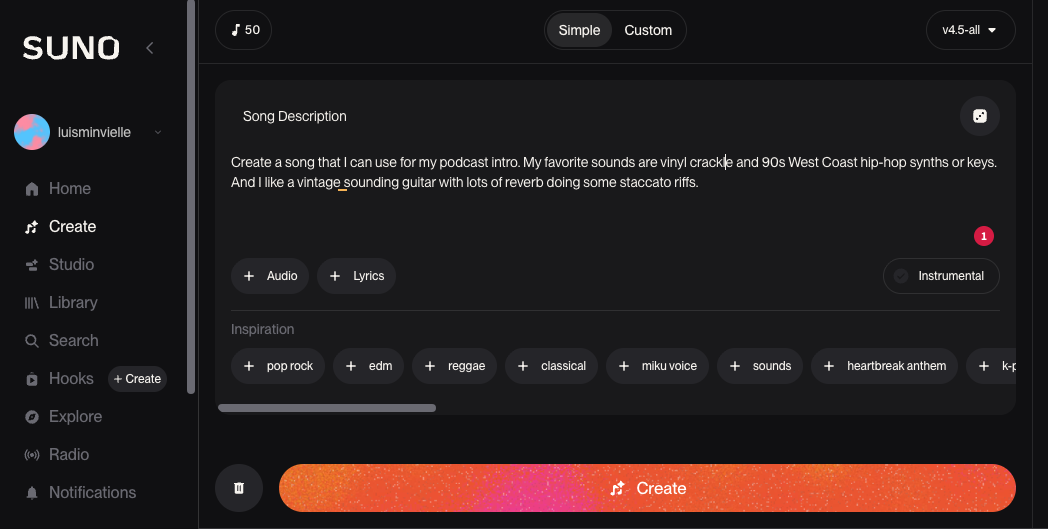
The system analyzes your prompt, interprets mood and intent, then composes arrangements that match your creative vision. The vocals can shift between tones, genres, and emotional settings. This experience mirrors working with songwriting software, except the creative jump from idea to finished track happens almost instantly.
Recommended Read: Royalty Free Music
Why Suno Is the Best Free Text To Song Tool
Suno is the best text to song tool on the market because it gives creators expressive control without slowing them down. It's just one more tool in a creator’s toolbox that helps them avoid routine hurdles, such as creative block, fast and with amazing output quality. The platform supports multiple vocal styles, genres, instruments, and styles. You can even create a custom Persona that allows you to maintain a consistent identity across multiple songs. These are especially useful for brands, podcasts, or creators with recurring segments.
Every song you make on Pro or Premier includes full ownership of their songs, while songs made using the Basic plan only allow for personal use. You can download MP3s instantly, and higher plans unlock WAV, MIDI, and video exports. This clarity around rights outperforms other tools that limit commercial usage. With Suno, creators who need royalty-free music for commercial use get speed, quality, and legal certainty at once.
Step-By-Step: How To Use Text to Song With Suno
Suno’s workflow is intuitive to get a hold of, so creating a song with its text to song tool is very straightforward. Still, a few things to keep in mind before diving into the steps: the clearer your idea, the stronger the track. A few mood descriptors, genre notes, or emotional cues go a long way. Now, the steps:
Step 1: From Idea to Prompt
Inside the Create tab, you’ll see two options: Simple and Custom. Simple mode works well for quick ideas: it's simply prompt to song. Custom mode opens things up even more. You can upload your own lyrics, create new ones with Auto Lyric, hum a melody, drop in a short audio clip, or remake an existing idea in a new style. Every detail is adjustable, from instruments and vocal tone to tempo, structure, and mood.
Clear prompts help the system understand the music you want to create. Picture the scene, then explain it plainly. Add emotional cues or small details when you need movement, tension, or space. Notes like “slow fade at the end” or “lift before the chorus” also bring extra direction to the track.
Once you're ready, press Create and Suno will give you two versions to listen to and test out.
Step 2: Listen and Refine
Check out the two songs you created. You can save them, remove what you don’t need, or keep them in your workspace for later. Pro users unlock the Song Editor, where every track splits into 12 stems for deeper adjustments. You can edit lyrics, replace a section, or reshape the arrangement. Premier users can open Suno Studio for full creative control inside the AI-native Digital Audio Workstation (DAW).
Step 3: Download
When your track feels ready, choose your download format. Free users can export MP3 files. Pro users unlock WAV and video exports, and Premier users can also download MIDI. Licensing stays clear throughout the process: free users have personal-use rights, while Pro and Premier plans include full ownership and commercial-use permission.
Recommended Read: How to Make a Song with Suno
Free Text to Song Features You Get With Suno
Every user starts with free text to song features that make music creation accessible:
- Free downloads
- AI singing voice generator tools built directly into the workflow
- Multiple vocal styles, such as AI rapper voice options
- The ability to create a fully custom song without mics, mixers, or equipment
These tools help creators in all stages of their creative journey. Newbies can start dabbling with song making, hobbyists can learn how to handle new genres, and pros can sketch up quick ideas or get ahead of the game by beating creative blocks.
Best Use Cases for Text To Song
Creators use Suno’s text to song tool across countless formats. Here are the most common:
- Creating a song from scratch
- Catchy jingles for brands
- Soundtracks for videos and short-form content
- Royalty free music for commercial use
- TikTok audios, loops, intros, and ambient backgrounds
- Podcast intro/outro themes
How To Do the TikTok Text to Song Trend with Suno
The text to song trend took over TikTok in 2026, and Suno sits at the center of it. Creators are pasting real text messages (from a "boomer," an ex, or a group chat) into Suno and turning them into full songs with vocals, melody, and production. That's all it takes, really.
The most viral variations include:
- Turning a dad's or grandpa's messages into a song
- Flipping a breakup text or a toxic ex's last paragraph
- Making a group chat meme into a track
Here's the workflow most creators follow:
- 1. Copy the text or conversation you want to use.
- 2. Open Suno, go to Create and press the + Lyrics option so you can paste your text
- 3. Add a short style prompt (for example, "rage trap song with this lyrics,” or maybe “2010s pop punk, bright chorus”).
- 4. Create, pick your favorite version, and download the MP3.
- 5. Record a 15 to 30 second TikTok with the original texts on screen while the Suno track plays underneath.
If you want to jump straight into the format creators are riding, try Suno's text message song template. It's built specifically for the text to song trend and handles conversational lyrics without extra prompting.
Create Music Freely With Suno’s Text to Song Tool
Now you know how simple it feels to turn ideas into full songs with Suno. Explore your creative vision and move it from text to song in minutes, then use the editing tools to refine your work, and stay safe with the clarity the licensing gives you for commercial use.
Try Suno’s text to song workflow and start creating music right now. It takes a few clicks.
Text to Song FAQs
How do I use an AI music generator from text?
Open Suno, click the Create tab, write down your idea, and create your track in minutes.
How can I generate music from text for free?
With Suno’s Basic (free) plan, you can create songs based on prompts.
What’s the best AI music generator free?
Suno offers the most complete set of tools for expressive vocals, mixing, and fast AI music creation.
How do I generate music from text online?
Paste your lyrics or prompt them, describe your style, and create your track.
AI Rap Generator: Create Hip-Hop Songs Instantly
Generate hip-hop songs, rap lyrics and beats instantly with Suno’s AI Rap Generator. Write, rhyme, and produce original rap songs in seconds.

Best AI Beat Maker: Create Quality AI Beats With Suno
The best AI beat maker is Suno. Suno is an AI-assisted music creation and production tool you can create hip-hop and rap beats with.