
Is Suno's AI Music Software Worth the Monthly Subscription?
Date Updated

When evaluating music software, Suno’s output makes up for the cost by giving users high-quality results without mandating them to invest the resources and time that traditional software would require.
The hesitation many creators feel around paying for tools rarely comes down to the monthly fee itself. It comes from uncertainty around return. Will this replace other expenses, save meaningful time, or deliver output that was previously unreachable? The traditional path has trained people to expect long learning curves, stacked purchases, and delayed payoffs. A digital audio workstation (DAW) alone does not make finished tracks. Plugins, instruments, vocals, and mixing time add up fast. Session singers, beat licenses, and studio hours push the real cost higher.
With Suno’s AI music software, the value calculation changes. In this article, we’ll go through how Suno compares to traditional music software and why the monthly subscription is worth it for you.
How Suno Compared to Traditional Music Production Software
Suno itself operates as an AI music software. On the initial tiers, it does not aim to simulate timeline-based editing or manual sound design. It focuses on text-to-music creation by managing structure, arrangement, vocals, and instrumentation. Traditional music software centers on control, and Suno on outcome. It replaces the need to source beats, scratch vocals, demo singers, or placeholder tracks.
.jpg?2026-01-28T18%3A25%3A03.757Z)
Still, on the Premier plan, subscribers gain access to Suno Studio, a browser-based, AI-powered DAW that supports hands-on editing. While it does not aim to replace full desktop workstations for advanced engineering, it does allow timeline editing, detailed layering, MIDI export, and the creation of vocals, drums, and synths that fit smoothly with your existing audio.
How Suno Fits Into A Modern Music Studio Workflow
Suno supports creators at different stages of production. Content creators producing reels, YouTube videos, or podcasts can create original background music without risking copyright claims or demonetization. Non-technical artists can create original finished songs without investing in hardware, microphones, or software stacks. Producers and musicians can use Suno as a sketchpad. During creative blocks, it helps with brainstorming, coming up with early ideas, and building references before moving on to full production environments.
Though these are just some of the most straightforward ways to use Suno’s AI music software, the possibilities are endless, and what matters most is how it complements your workflow the best.
Suno Pricing, Explained
Suno’s subscription structure is straightforward compared to a good deal of music software available in the market. Each tier scales output volume, flexibility, and tools.
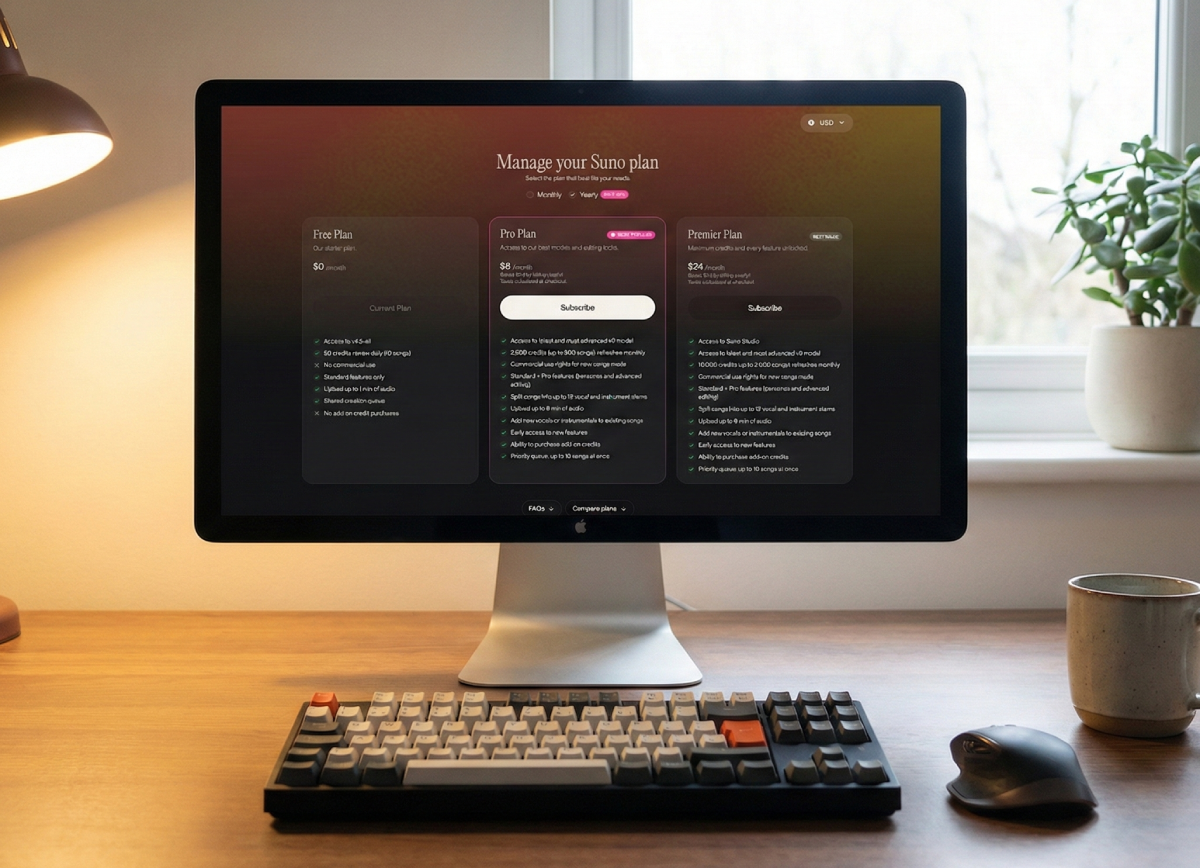
Free Plan: $0!
The Free Plan suits anyone curious about how AI music software works. It includes 50 credits that renew daily, equal to up to ten short songs per day. Users can upload up to one minute of audio.
Limitations appear quickly, though. Deeper refinement, higher-quality downloads, and monetization remain unavailable. For experimentation, the plan works. For publishing or client use, it falls short.
Pro Plan: Starts At $8/Month
The Pro Plan targets creators who want more control and higher output quality in their music software. It includes 2,500 monthly credits (roughly 500 songs) and audio uploads up to eight minutes per project. You will also benefit from greater stability in genres and greater structural coherence across tracks and cuts back the need for retries.
With the Song Editor, songs can be split into up to twelve vocal and instrumental stems. Pro users gain access to feature previews and optional credit purchases. At this tier, you gain commercial usage rights, so you can use your songs across monetized projects or client work.
Premier Plan: Starts At $24/Month
The Premier Plan is intended for users that need to expand volume and flexibility. With 10,000 credits per month, users can create up to 2,000 songs. Building on commercial rights, Premier access includes Suno Studio, the first-ever AI-native DAW. This tier aligns more closely with production software workflows that demand iteration at scale.
Monthly Vs. Yearly Cost Comparison
You can save 20% yearly by purchasing an annual plan. Here’s the breakdown:
Monthly | Yearly | |
Free | $0 | $0 |
Pro | $10 | $8 |
Premier | $30 | $24 |
Commercial Rights: Where the Real Value Is
Suno has clear rights and ownership guidelines. The free tier allows for personal use only. Paid plans include monetization across platforms, client work, and advertising across all songs made with Suno’s music software. That includes YouTube videos, Spotify releases, paid ads, and branded content.
In practice, this replaces several external costs. Hiring session musicians, booking studio time, or purchasing exclusive licenses for custom music often costs hundreds per track. Let’s take a closer look at what you’ll be saving by subscribing to Suno’s paid tiers.
Suno Vs. Buying Traditional Music Software
Traditional music software setups add up quickly. A DAW alone ranges from $99 to $799, according to Ableton, Logic Pro, and FL Studio pricing pages. Plugins, sample packs, and virtual instruments can push initial costs over $1,000. Beat licensing from beat sites commonly runs $30–$200 per track for limited rights and nonexclusive usage. Plus, learning curves add hidden costs. Mastering music production software may take months, and lessons or courses can be expensive.
That puts even a modest setup at $1,200+ in the first year, without counting hardware, vocalists, studio time, upgrades, or additional licenses. For result-driven creators, Suno becomes a much more affordable alternative.
Suno Vs. Hiring A Studio Or Producer
Working with a studio or producer usually starts with a minimum spend. Home and project studios often charge $20–$75 per hour, with mandatory two-to-four-hour bookings. Professional studios move that number to $75–$300+ per hour, or $300 to $2,000+ per day for lockout sessions. Mixing and mastering costs add another $125–$750 per track. Session musicians, vocalists, or producers increase the total by $50–$300+ per part.
Pricing shifts based on where you live, availability, and who you hire. The minimum total cost for one professionally recorded song often starts around $300–$500, even at the low end.
As a music software, Suno wins on speed, iteration, and affordability. Users can test ideas instantly, revise without negotiation, and explore multiple directions without additional fees.
Who Should Pay for Suno Straight Away
As an AI music software, Suno delivers clear value for content creators working at volume, marketers who need reliable, brand-safe background music, artists preparing demos, and solo creators without access to a production team. In each case, the monthly cost replaces a mix of scattered expenses, including beat licenses, studio time, revisions, and outside collaborators. Instead of budgeting per track or per session, creators gain predictable access to original music they can adapt as their needs change.
Who Should Not Subscribe to Suno
Creators whose work depends on detailed manual mixing, live performance recording, or hands-on engineering may find that AI music software works best alongside other tools rather than as a standalone solution.
It is not designed to replace a dedicated music mixer. Instead, Suno focuses on the creation stage and proposes a way to shape complete musical ideas that can later be refined elsewhere if deeper post-production is required.
Is Suno Worth the Monthly Subscription?
For results-driven creators who value output, the answer is a clear yes. Compared to money spent on other music software stacks, licensing, studios, and talent, Suno becomes a no-brainer purchase once regular publishing or client delivery enters the picture. For artists and engineers who prefer hands-on production or detailed mixing, it works better as a secondary layer alongside existing setups.
If you fit into one of these categories, sign up for Suno’s Pro or Premier plan now.
FAQs
Is Suno considered professional music software?
Yes, paid plans allow for both business publishing and personal use.
Is Suno more affordable than traditional music production software?
The total cost of the finished song created with Suno is still slightly lower than the cost of software packages and plugins put together, especially when compared to solutions like Ableton.
Can Suno replace a recording studio?
No. It replaces early-stage creation and some production needs, not live recording.
Does Suno include commercial rights on paid plans?
Yes, commercial use is included exclusively on paid plans.
Is Suno better than beat maker apps?
Yes, because it gives you a wide range of musical building blocks, including beats, loops, samples, and complete compositions.
Is Suno worth it for non-musicians?
Yes, especially for creators focused on publishing rather than production methods.
Best DAW for Beginners: Affordable and Free Music-Making Software
The best DAW for beginners is Suno Studio. Look at affordable and free music-making software like Suno Studio to start producing songs fast.

Best AI Beat Maker: Create Quality AI Beats With Suno
The best AI beat maker is Suno. Suno is an AI-assisted music creation and production tool you can create hip-hop and rap beats with.